> ## Documentation Index
> Fetch the complete documentation index at: https://resource-center-zoho-crm-staging-feb20.mintlify.site/llms.txt
> Use this file to discover all available pages before exploring further.
# Porting out
> Transfer your phone numbers from Quo, formerly OpenPhone, to another provider
## Overview
When you need to transfer your phone numbers to a different provider, the porting out process ensures a smooth transition with no service interruption. Your numbers remain fully operational until the transfer completes.
## Before you begin
### Requirements
Porting out is not available during the trial period. You must have an active paid account to initiate a port-out request.
### Information you'll need
Before starting the port-out process, gather the following information:
* **Phone numbers**: The specific number(s) you want to port out
* **Account email**: The email address associated with your workspace
* **Your name**: As it appears on your account
* **New carrier**: The provider you're transferring to
* **Reason for porting**: Brief explanation for the transfer
## Port out process
Fill out the [port out request form](https://toolbox.quo.com/p/port-out-request/newsubmission) with all required information:
* Phone numbers to port
* Account email address
* Your name
* New carrier information
* Reason for porting
[View the step-by-step guide.](https://support.quo.com/core-concepts/administration/porting-out#using-the-port-out-request-form)
Submit the form to our porting team for processing.
Within 24 to 48 business hours, we'll send you the information your new carrier needs:
* Account number
* PIN or password (if applicable)
* Service address on file
* Any other required details
The details you provide in your Letter of Authorization (LOA) must exactly match the information we provide. Any discrepancies can delay or prevent the port.
Work with your new carrier to complete the transfer:
* Provide the port-out information we sent
* Complete their Letter of Authorization (LOA)
* Submit any additional documentation they require
* Ensure all details match exactly
Your new carrier will handle the rest:
* They'll confirm your port date
* Transfer typically takes 1-14 days
* Your number stays active on Quo until the port date
* No action needed from you during this period
* Service transfers automatically on the scheduled date
### Using the port out request form
1. Begin a new [port out request ](https://toolbox.quo.com/p/port-out-request/newsubmission)using this form.
* Enter your **first name** and **last name**
* Enter the email address linked to your Quo account
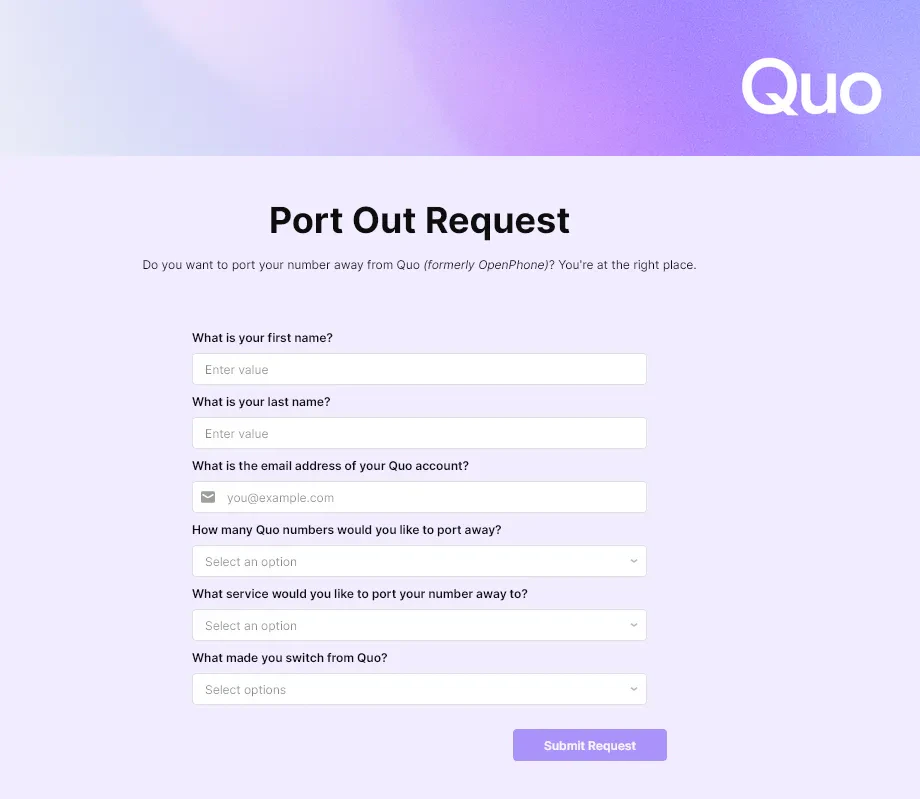 2. Choose if you’re porting out “**One”** or “**More than one”** phone numbers
* If porting **one number**, type it into the field.
* If porting **multiple number**, please follow any of these steps:
* Click the **“Copy & Paste Number”** button and paste the phone numbers in the field, or
* Click the **“Upload CSV”** button to upload a CSV file with the phone numbers
* If you do not have a ready CSV file, you can click the **“Download Template”** button to provide the phone numbers to the file before uploading.
2. Choose if you’re porting out “**One”** or “**More than one”** phone numbers
* If porting **one number**, type it into the field.
* If porting **multiple number**, please follow any of these steps:
* Click the **“Copy & Paste Number”** button and paste the phone numbers in the field, or
* Click the **“Upload CSV”** button to upload a CSV file with the phone numbers
* If you do not have a ready CSV file, you can click the **“Download Template”** button to provide the phone numbers to the file before uploading.
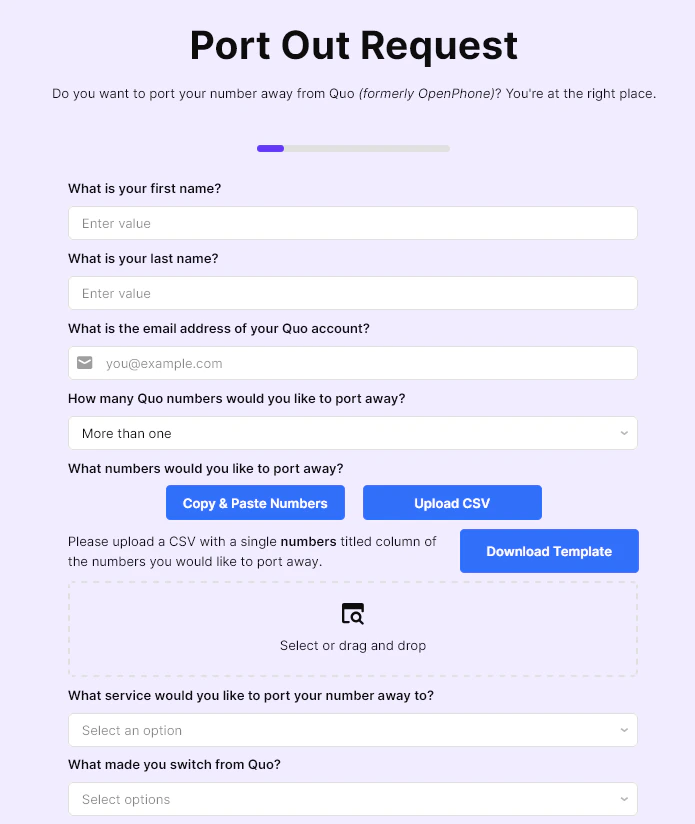 4. Select the **new service (carrier)** where you’d like to port your number to
* If your carrier is not listed, choose **“Other”** and type your new carrier’s name
4. Select the **new service (carrier)** where you’d like to port your number to
* If your carrier is not listed, choose **“Other”** and type your new carrier’s name
.png?fit=max&auto=format&n=oiUUkb01If-JfZZn&q=85&s=59fe638ed081ad4fa12cf669b241ab08) 5. Select the reason why you’re porting away, then click the **“Submit”** button.
5. Select the reason why you’re porting away, then click the **“Submit”** button.
.png?fit=max&auto=format&n=oiUUkb01If-JfZZn&q=85&s=59e0aba7e6557e27e3d0d80305524f18) That’s it! Please expect to get an update from us within 24 to 48 business hours. We’ll send the port-out details to the phone number owner’s email address.
## Timeline and expectations
### Service continuity
* **Before port date**: Your number works normally on Quo
* **On port date**: Service transfers to your new carrier
* **After port date**: Number is active with new provider
### Typical timeframes
* **Response time**: Port-out details within 48 business hours
* **Transfer time**: 1-14 days depending on receiving carrier
* **Business numbers**: May take longer than personal numbers
## Important considerations
### What happens to your data
When you port out:
* Call history remains in your account until you close it
* Text messages stay accessible until account closure
* Voicemails should be downloaded before porting
* Contact lists remain in your workspace
### Billing implications
* You're responsible for charges until the port completes
* Port completion doesn't automatically cancel your subscription
* Contact support to adjust billing after successful port
## FAQs
No, you must have an active paid account to port out numbers. This protects against abuse and ensures proper account verification.
Contact our support team immediately. We'll provide any additional documentation or clarification your new carrier requires to complete the port.
Yes, as long as the port hasn't been completed. Contact both our support team and your new carrier immediately to stop the process.
No, numbers aren't lost during porting. If a port fails, your number remains active with Quo. You can retry the process after resolving any issues.
Yes, you can include multiple numbers in your port-out request. List all numbers you want to transfer when submitting the [Port Out Request form](https://toolbox.quo.com/p/port-out-request/newsubmission).
## Need help?
If you have questions or encounter issues during the port-out process, [contact our support team](https://support.quo.com/help/submit-a-request). We're here to ensure your transition goes smoothly.
That’s it! Please expect to get an update from us within 24 to 48 business hours. We’ll send the port-out details to the phone number owner’s email address.
## Timeline and expectations
### Service continuity
* **Before port date**: Your number works normally on Quo
* **On port date**: Service transfers to your new carrier
* **After port date**: Number is active with new provider
### Typical timeframes
* **Response time**: Port-out details within 48 business hours
* **Transfer time**: 1-14 days depending on receiving carrier
* **Business numbers**: May take longer than personal numbers
## Important considerations
### What happens to your data
When you port out:
* Call history remains in your account until you close it
* Text messages stay accessible until account closure
* Voicemails should be downloaded before porting
* Contact lists remain in your workspace
### Billing implications
* You're responsible for charges until the port completes
* Port completion doesn't automatically cancel your subscription
* Contact support to adjust billing after successful port
## FAQs
No, you must have an active paid account to port out numbers. This protects against abuse and ensures proper account verification.
Contact our support team immediately. We'll provide any additional documentation or clarification your new carrier requires to complete the port.
Yes, as long as the port hasn't been completed. Contact both our support team and your new carrier immediately to stop the process.
No, numbers aren't lost during porting. If a port fails, your number remains active with Quo. You can retry the process after resolving any issues.
Yes, you can include multiple numbers in your port-out request. List all numbers you want to transfer when submitting the [Port Out Request form](https://toolbox.quo.com/p/port-out-request/newsubmission).
## Need help?
If you have questions or encounter issues during the port-out process, [contact our support team](https://support.quo.com/help/submit-a-request). We're here to ensure your transition goes smoothly.