> ## Documentation Index
> Fetch the complete documentation index at: https://resource-center-zoho-crm-staging-feb20.mintlify.site/llms.txt
> Use this file to discover all available pages before exploring further.
# Call transcripts and summaries
> Automatically generate AI-powered transcripts, summaries, and action items from recorded calls to save time and improve follow-up
## Overview
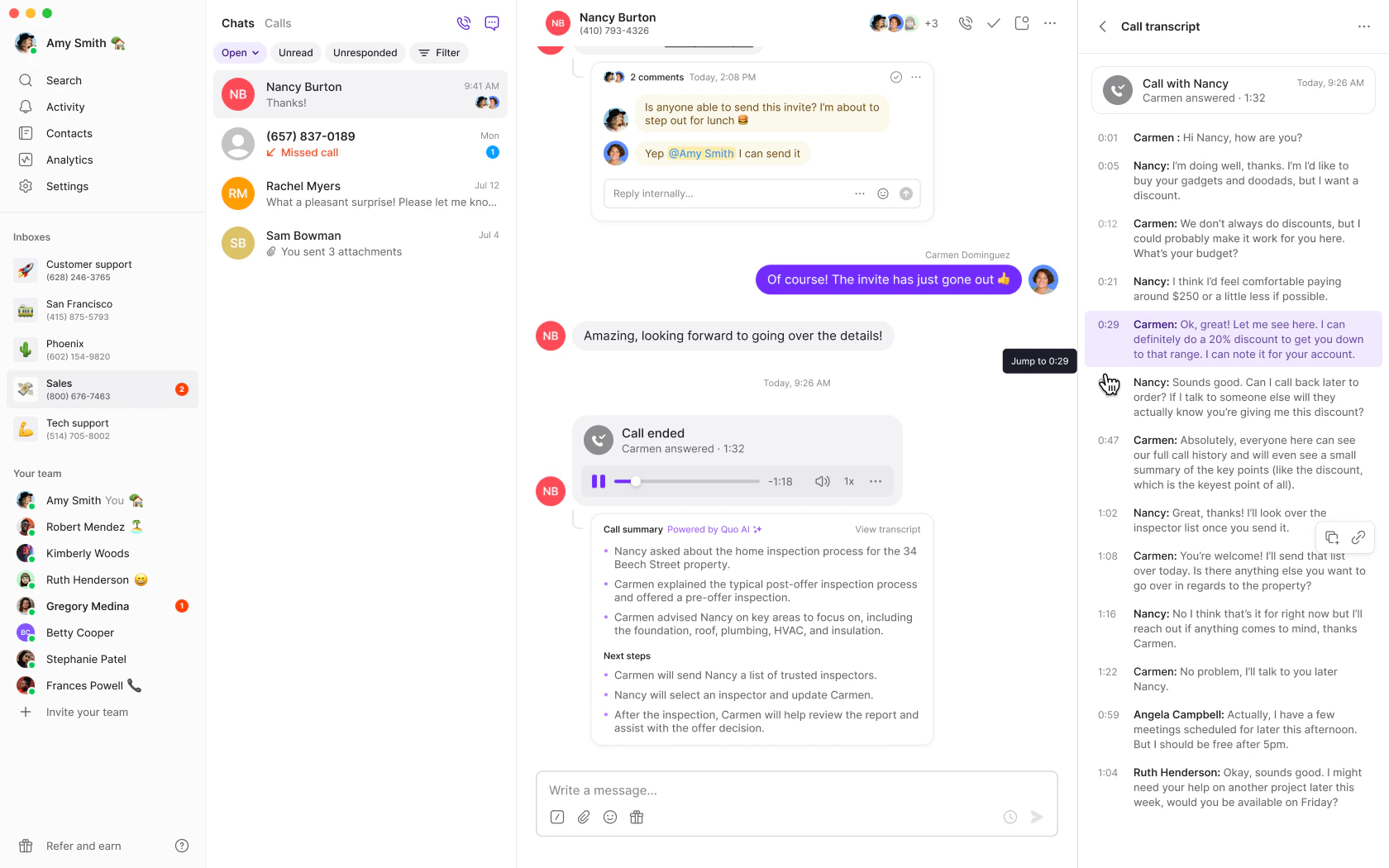
Quo, formerly OpenPhone, automatically generates AI-powered transcripts and summaries for all recorded calls, helping you save time and improve follow-up. Get speaker-separated transcripts, conversation summaries, and potential action items within seconds of ending a call.
Call transcripts and summaries are available on Business and Scale plans and require call recording to be enabled.
## Enabling transcripts and summaries
Call transcripts and summaries are enabled by default for Business and Scale plans. To disable or re-enable:
1. Go to **Settings** → **Phone numbers**
2. Select the specific phone number
3. Find **Transcribe and summarize calls** setting
4. Toggle on/off as needed
Transcription settings are configured per phone number, not account-wide.
## How it works
### Automatic generation
When you record a call, Quo automatically:
1. **Transcribes the conversation** with speaker identification
2. **Generates an AI summary** highlighting key points
3. **Identifies action items** for follow-up
4. **Delivers results** within seconds of call completion
### Accessing transcripts and summaries
After a recorded call ends:
1. **View the summary** in the conversation thread
2. **Click the call summary** to expand details
3. **Review action items** for follow-up tasks
4. **Open the transcript** to see the full conversation
 ## Language support
Quo supports call transcripts and summaries in 40+ languages:
### European Languages
* **Bulgarian**, **Catalan**, **Czech**, **Danish**, **Dutch**
* **English**, **Estonian**, **Finnish**, **Flemish**, **French**
* **German** (including Switzerland), **Greek**, **Hungarian**
* **Italian**, **Latvian**, **Lithuanian**, **Norwegian**
* **Polish**, **Portuguese**, **Romanian**, **Russian**
* **Slovak**, **Spanish**, **Swedish**, **Turkish**, **Ukrainian**
### Asian Languages
* **Chinese** (Mandarin Simplified/Traditional, Cantonese Traditional)
* **Hindi**, **Indonesian**, **Japanese**, **Korean**
* **Malay**, **Thai**, **Vietnamese**
Transcription accuracy may vary based on audio quality, speaker clarity, and language complexity.
# FAQs
Ensure you have a Business or Scale plan and that call recording is enabled for your phone number. Transcripts only generate for recorded calls.
Check call audio quality and minimize background noise. Speak clearly and avoid overlapping conversations for better AI transcription accuracy.
Only workspace Owners and Admins can modify transcription settings. Check your role permissions in the workspace.
Action items are only available on Scale plans. Business plan users get transcripts and summaries but not AI-generated action items.
Check the supported languages list above. If your language isn't supported, transcription may not work accurately or at all.
Transcripts are only generated for calls made after upgrading to Business or Scale plans. Previous calls cannot be retroactively transcribed.
## Language support
Quo supports call transcripts and summaries in 40+ languages:
### European Languages
* **Bulgarian**, **Catalan**, **Czech**, **Danish**, **Dutch**
* **English**, **Estonian**, **Finnish**, **Flemish**, **French**
* **German** (including Switzerland), **Greek**, **Hungarian**
* **Italian**, **Latvian**, **Lithuanian**, **Norwegian**
* **Polish**, **Portuguese**, **Romanian**, **Russian**
* **Slovak**, **Spanish**, **Swedish**, **Turkish**, **Ukrainian**
### Asian Languages
* **Chinese** (Mandarin Simplified/Traditional, Cantonese Traditional)
* **Hindi**, **Indonesian**, **Japanese**, **Korean**
* **Malay**, **Thai**, **Vietnamese**
Transcription accuracy may vary based on audio quality, speaker clarity, and language complexity.
# FAQs
Ensure you have a Business or Scale plan and that call recording is enabled for your phone number. Transcripts only generate for recorded calls.
Check call audio quality and minimize background noise. Speak clearly and avoid overlapping conversations for better AI transcription accuracy.
Only workspace Owners and Admins can modify transcription settings. Check your role permissions in the workspace.
Action items are only available on Scale plans. Business plan users get transcripts and summaries but not AI-generated action items.
Check the supported languages list above. If your language isn't supported, transcription may not work accurately or at all.
Transcripts are only generated for calls made after upgrading to Business or Scale plans. Previous calls cannot be retroactively transcribed.