> ## Documentation Index
> Fetch the complete documentation index at: https://resource-center-zoho-crm-staging-feb20.mintlify.site/llms.txt
> Use this file to discover all available pages before exploring further.
# Phone numbers
> Add, change, and manage multiple phone numbers for your business communications
## Overview
Manage all your business phone numbers in one place. Whether you need local numbers for different markets, toll-free numbers for customer support, or simply want to organize multiple lines for your growing team, you have complete control over your phone number setup.
## Types of phone numbers available
### Local numbers
* **US numbers**: Available in every state except Alaska
* **Canadian numbers**: Available across all provinces
* **Puerto Rico**: Not available for new numbers, but existing numbers can be ported
### Toll-free numbers
North American toll-free numbers with these prefixes:
* 800, 833, 844, 855, 866, 877, 888
* All toll-free numbers are text-enabled
* No charge to callers from US and Canada
### International numbers
Currently, we only offer US and Canadian numbers. If you need numbers from other countries, please fill out this [form](https://openphone.typeform.com/to/EBQC15bA) to help us prioritize future offerings.
## Adding phone numbers
You can add unlimited phone numbers to your account. Any additional numbers must be purchased or ported first and are added to your [monthly subscription](https://support.quo.com/core-concepts/administration/billing/pricing). Here’s how to add more:
1. Go to **Settings → Phone Numbers**
2. Click **+ Add a new number**
3. Search by:
* City name
* Area code
* Toll-free option
4. Select your number
Adding phone numbers must be done through the web or desktop app. Mobile users should access the web version to add new numbers.
If you're paying through Apple or Google Play, you'll need to switch to credit card payments to add additional numbers. [Contact support](https://support.quo.com/help/submit-a-request) for assistance.
## Naming and organizing numbers
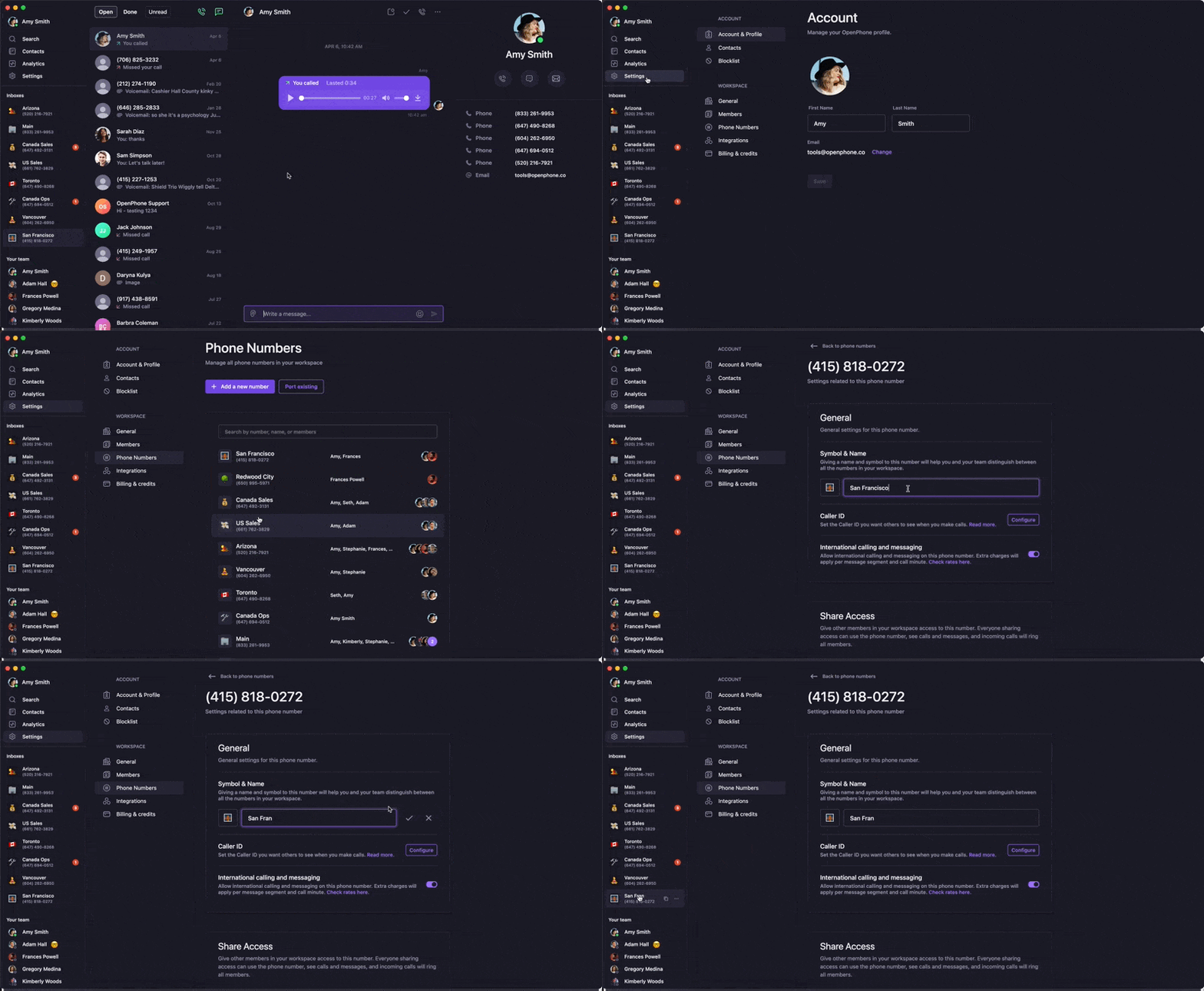
Keep your growing number collection organized by adding custom names and emojis to each phone number.
### Setting names and emojis
1. Open **Settings** from the left menu
2. Under "Workspace", click **Phone Numbers**
3. Select the number to name or rename
4. In the "General" section:
* Type your preferred name
* Add an emoji to the left of "Name"
5. Click the checkmark to save
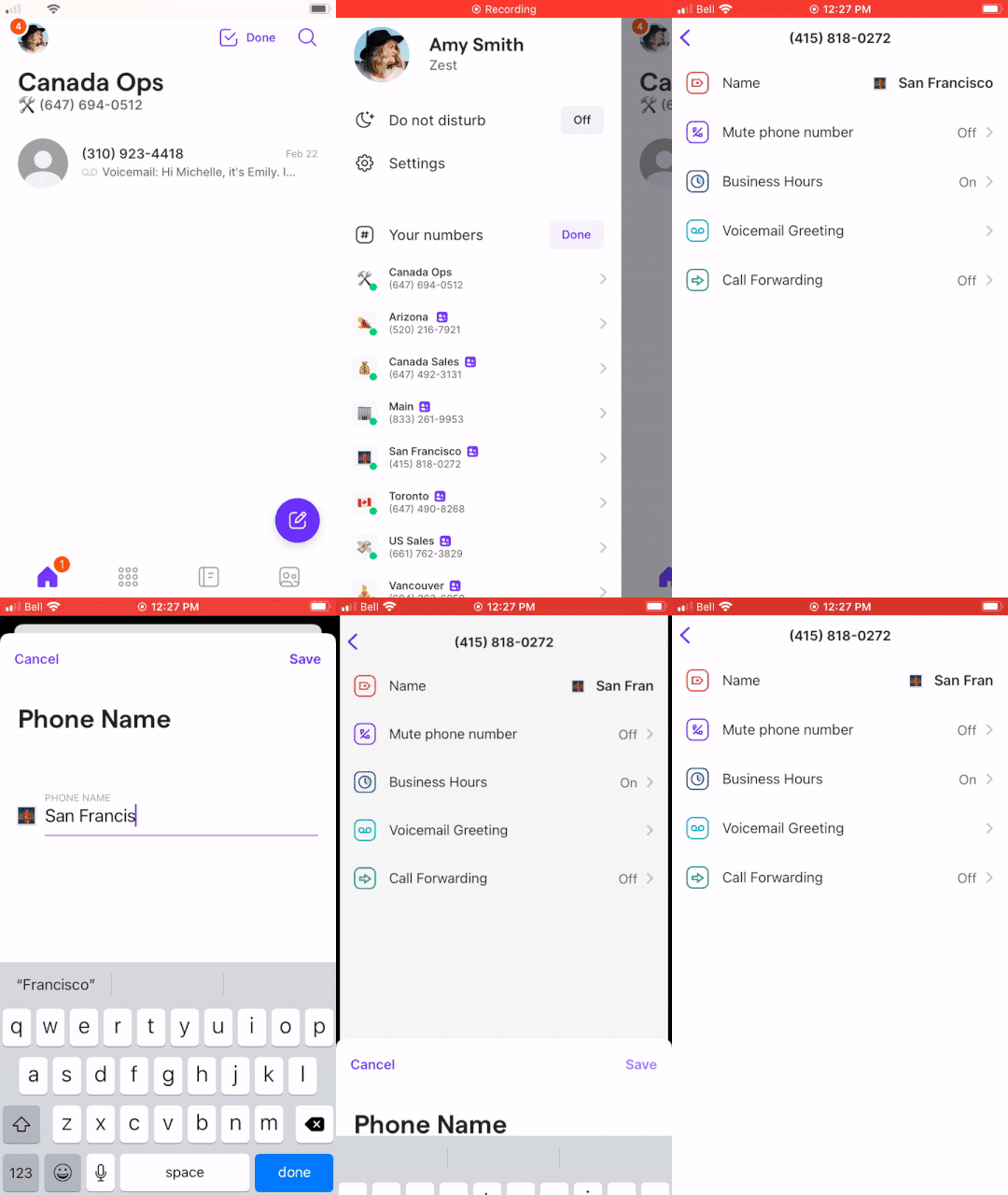
 1. Tap your account icon (top-left)
2. Tap **Manage** next to "Your numbers"
3. Select the number to rename
4. Tap **Name**
5. Enter new name and tap **Save**
1. Tap your account icon (top-left)
2. Tap **Manage** next to "Your numbers"
3. Select the number to rename
4. Tap **Name**
5. Enter new name and tap **Save**
 ### How names and emojis appear
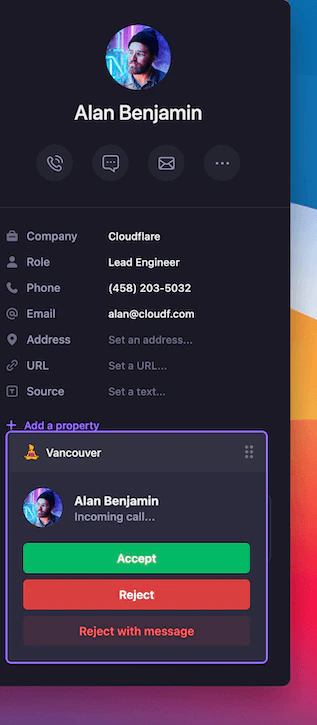
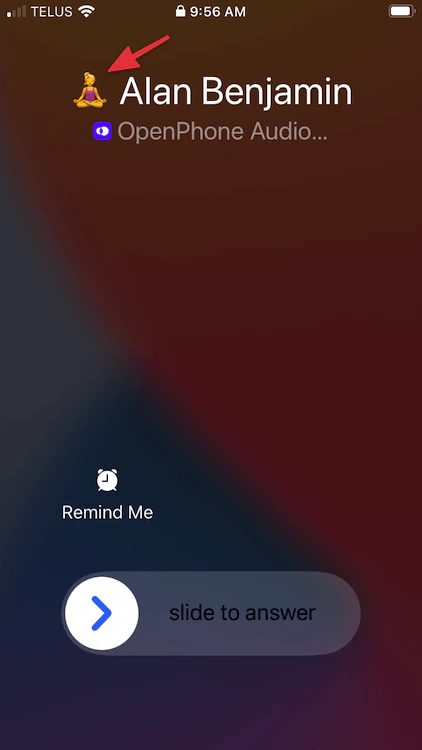
Your custom names and emojis help identify incoming calls:
**On web/desktop**: Both the name and emoji appear with incoming calls
### How names and emojis appear
Your custom names and emojis help identify incoming calls:
**On web/desktop**: Both the name and emoji appear with incoming calls
 **On mobile**: The emoji appears with incoming calls
 ## Changing phone numbers
If you need to change your phone number, you can delete the current one and add a new one.
Changing your phone number will permanently remove all data associated with it, including call and messaging history.
### Steps to change numbers
1. Go to [Settings](https://my.quo.com/settings/profile) in web/desktop (not available on mobile)
2. For team numbers: Admins/owners should go to [Phone Numbers](https://my.quo.com/settings/phone-numbers)
3. Click the phone number to remove
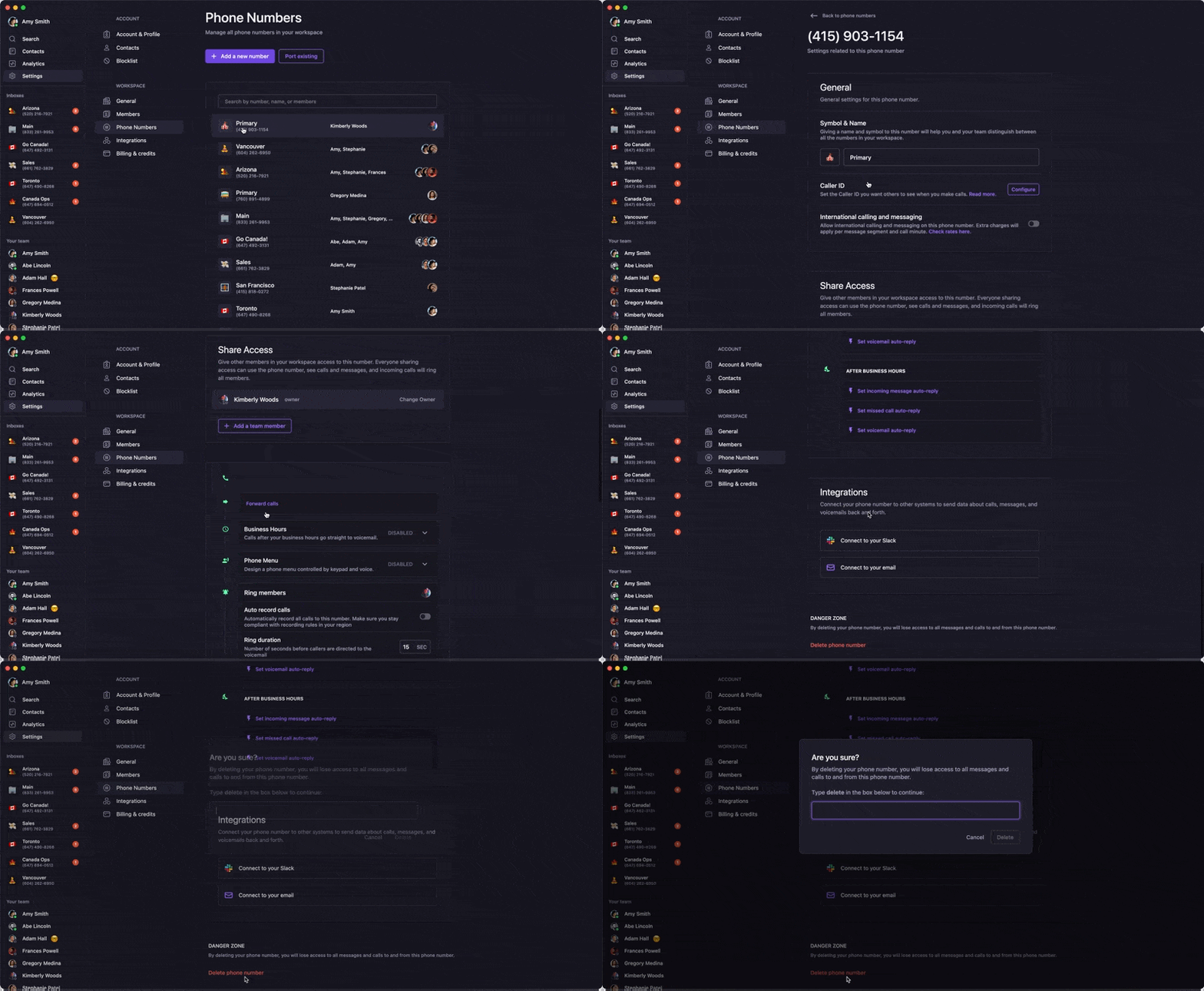
4. Scroll to "Danger Zone" and click **Delete phone number**
5. Type "delete" to confirm
6. Refresh the app to select a new number
## Changing phone numbers
If you need to change your phone number, you can delete the current one and add a new one.
Changing your phone number will permanently remove all data associated with it, including call and messaging history.
### Steps to change numbers
1. Go to [Settings](https://my.quo.com/settings/profile) in web/desktop (not available on mobile)
2. For team numbers: Admins/owners should go to [Phone Numbers](https://my.quo.com/settings/phone-numbers)
3. Click the phone number to remove
4. Scroll to "Danger Zone" and click **Delete phone number**
5. Type "delete" to confirm
6. Refresh the app to select a new number
 ## Deleting phone numbers
Remove phone numbers you no longer need from your account.
### Requirements
* You must be an admin or owner to delete shared team numbers
* Deletion must be done from web or desktop app
### Deletion process
1. Go to [Phone Numbers](https://my.openphone.co/settings/my-phone-numbers) in workspace settings
2. Click the number you want to remove
3. Scroll to "Danger Zone"
4. Click **Delete \[phone number name]**
5. Type "Delete \[phone number name]" to confirm
## Deleting phone numbers
Remove phone numbers you no longer need from your account.
### Requirements
* You must be an admin or owner to delete shared team numbers
* Deletion must be done from web or desktop app
### Deletion process
1. Go to [Phone Numbers](https://my.openphone.co/settings/my-phone-numbers) in workspace settings
2. Click the number you want to remove
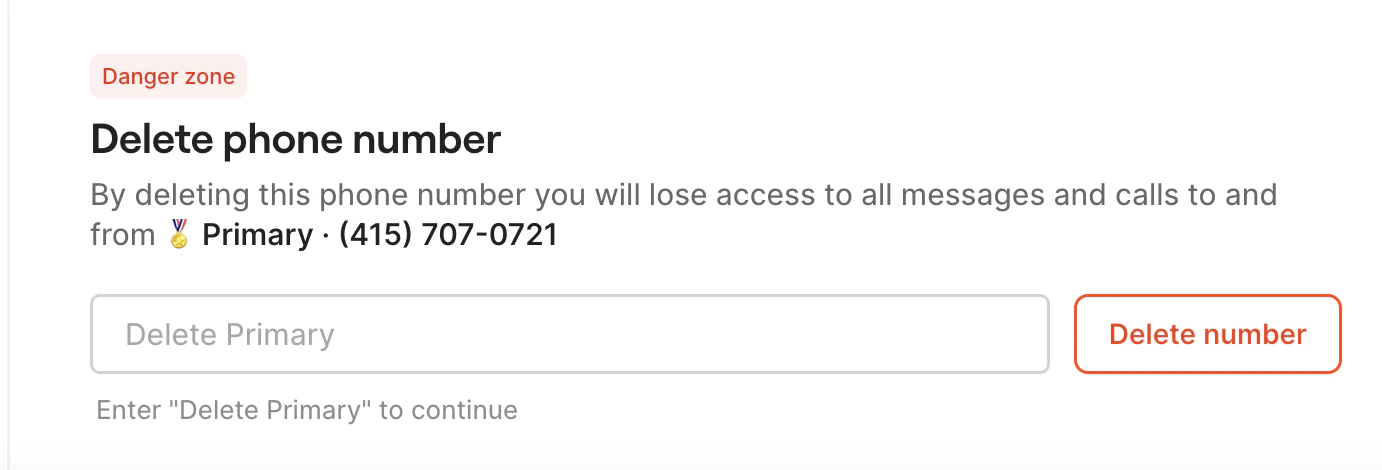
3. Scroll to "Danger Zone"
4. Click **Delete \[phone number name]**
5. Type "Delete \[phone number name]" to confirm
 Deleting a phone number doesn't cancel your subscription. It only removes that specific number and adjusts your billing automatically.
## Choosing between local and toll-free
**Choose local numbers when:**
* Establishing presence in a specific area
* Making many outbound calls (perceived as more trustworthy)
* Serving primarily local customers
**Choose toll-free numbers when:**
* Customer support is your main use case
* You want to appear larger and more established
* Serving customers nationwide
* You don't want callers to pay long-distance charges
Learn more in our blog post about [choosing between local and toll-free numbers](https://www.quo.com/blog/local-vs-toll-free-phone-number-for-business/).
## Vanity numbers
While we can't guarantee specific vanity numbers like 1-800-FLOWERS, you can:
* Search for numbers with specific digit sequences
* Look for patterns that match your business (e.g., "DOGS" = 3647)
* Use [Number Barn](https://www.numberbarn.com/) to find vanity numbers and port them to Quo, formerly OpenPhone
## FAQs
Yes! There's no limit to how many phone numbers you can have on your account. Add as many as your business needs.
When you delete a phone number, you permanently lose access to all messages and calls associated with that number. Make sure to export any important data before deletion.
Currently, we only offer US and Canadian numbers, plus North American toll-free numbers. We cannot provide new Puerto Rican numbers, but you can port existing ones.
Toll-free numbers support sending and receiving SMS, MMS (pictures), videos, GIFs, files, and reactions. However, they don't currently support group messaging.
Deleting a phone number doesn't cancel your subscription. It only removes that specific number and adjusts your billing automatically.
## Choosing between local and toll-free
**Choose local numbers when:**
* Establishing presence in a specific area
* Making many outbound calls (perceived as more trustworthy)
* Serving primarily local customers
**Choose toll-free numbers when:**
* Customer support is your main use case
* You want to appear larger and more established
* Serving customers nationwide
* You don't want callers to pay long-distance charges
Learn more in our blog post about [choosing between local and toll-free numbers](https://www.quo.com/blog/local-vs-toll-free-phone-number-for-business/).
## Vanity numbers
While we can't guarantee specific vanity numbers like 1-800-FLOWERS, you can:
* Search for numbers with specific digit sequences
* Look for patterns that match your business (e.g., "DOGS" = 3647)
* Use [Number Barn](https://www.numberbarn.com/) to find vanity numbers and port them to Quo, formerly OpenPhone
## FAQs
Yes! There's no limit to how many phone numbers you can have on your account. Add as many as your business needs.
When you delete a phone number, you permanently lose access to all messages and calls associated with that number. Make sure to export any important data before deletion.
Currently, we only offer US and Canadian numbers, plus North American toll-free numbers. We cannot provide new Puerto Rican numbers, but you can port existing ones.
Toll-free numbers support sending and receiving SMS, MMS (pictures), videos, GIFs, files, and reactions. However, they don't currently support group messaging.