> ## Documentation Index
> Fetch the complete documentation index at: https://resource-center-zoho-crm-staging-feb20.mintlify.site/llms.txt
> Use this file to discover all available pages before exploring further.
# Number porting
> Transfer your existing phone numbers from any carrier to Quo, formerly OpenPhone, with our simple porting process
## Overview
Porting lets you move your existing phone number from another provider to Quo so you can keep the number your customers already know, while using Quo’s features.
## What is porting?
Number porting is the process of **transferring a phone number** from your current provider to a new one. This FCC-mandated process ensures you can keep your phone number when changing carriers, whether it’s a landline, wireless, or internet-based number.
### The porting process
We submit a port request to your current provider and negotiate a port date on your behalf.
Once we hear back from your carrier, we’ll inform you of the scheduled port date and time.
On the port date, your phone number becomes available in your Quo account.
After successful porting, contact your old carrier to make sure your subscription is canceled. Some carriers automatically cancel subscriptions, while others need to be notified.
## Before you transfer your number
### What you need to know
Before you start a port request, keep these in mind:
**Service limitations**
* Only call and SMS functions transfer with your number
* Carrier registration doesn't continue from previous providers
* Internet or bundled services tied to the number won't transfer
* Previous conversations and call history don't carry over
**Technical requirements**
* Internet access is required to use Quo
* SMS functionality may take up to 48 hours to fully stabilize after the transfer
* Emergency services (911) aren't available through Quo
* Some services won't send SMS verification codes to virtual numbers
Don't cancel your current service until the port is complete. Canceling early risks losing your number permanently.
### Supported number types
We can port most North American numbers:
* **US local numbers**: All states supported
* **Canadian local numbers**: All provinces supported
* **Puerto Rico local numbers**: Supported
* **Toll-free numbers**: North American toll-free prefixes (800, 833, 844, 855, 866, 877, 888)
* **Not supported**: International numbers outside US/Canada
### Cost considerations
* **Quo fees**: No charges for porting in or out
* **Previous carrier fees**: Your current provider may charge a port-out fee
* **Additional numbers**: Numbers beyond your user count are billed at \$5/month starting 14 days after porting
## How to transfer your number
You must be a workspace Owner or Admin to initiate porting requests. Access the porting feature through the desktop or web app.
### Choose your porting flow
For transferring one phone number from a different carrier onto Quo.
For transferring multiple phone numbers (ex. a block of phone numbers) onto Quo.
The timeline, what happens during the port, and how to check status are the same for both flows. See [what to expect during and after your port](#what-to-expect-during-and-after-your-transfer).
### Video walkthrough
***
## How to port your phone number
Use this flow when you want to port one phone number into Quo directly from the app.
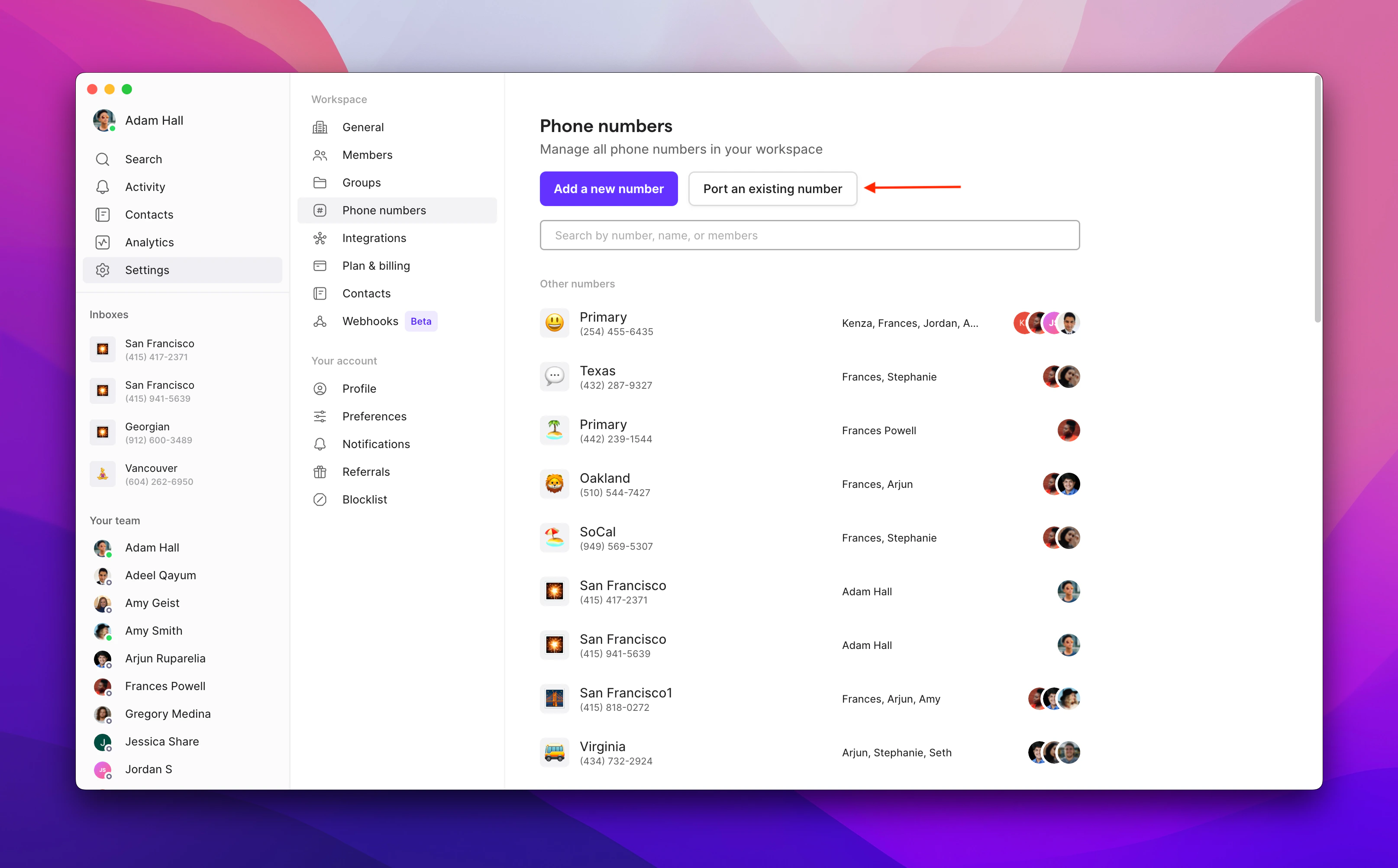
1. Navigate to **Settings → Phone numbers**, then click **Port an existing number**
2. Click **Continue to porting**
3. Enter your phone number and select your current carrier. If your carrier isn't listed, type it manually.
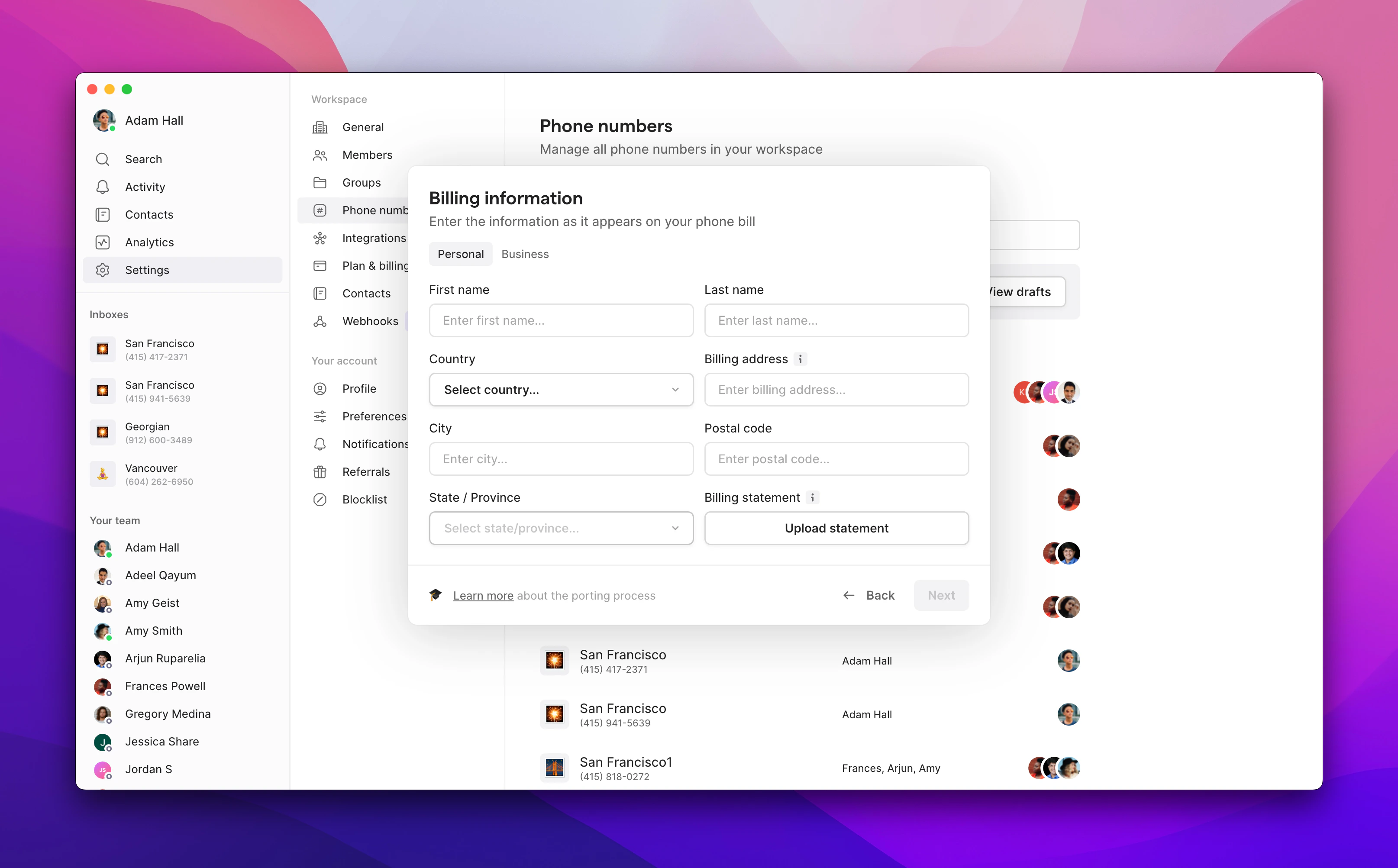
4. Upload your billing information and a recent statement.
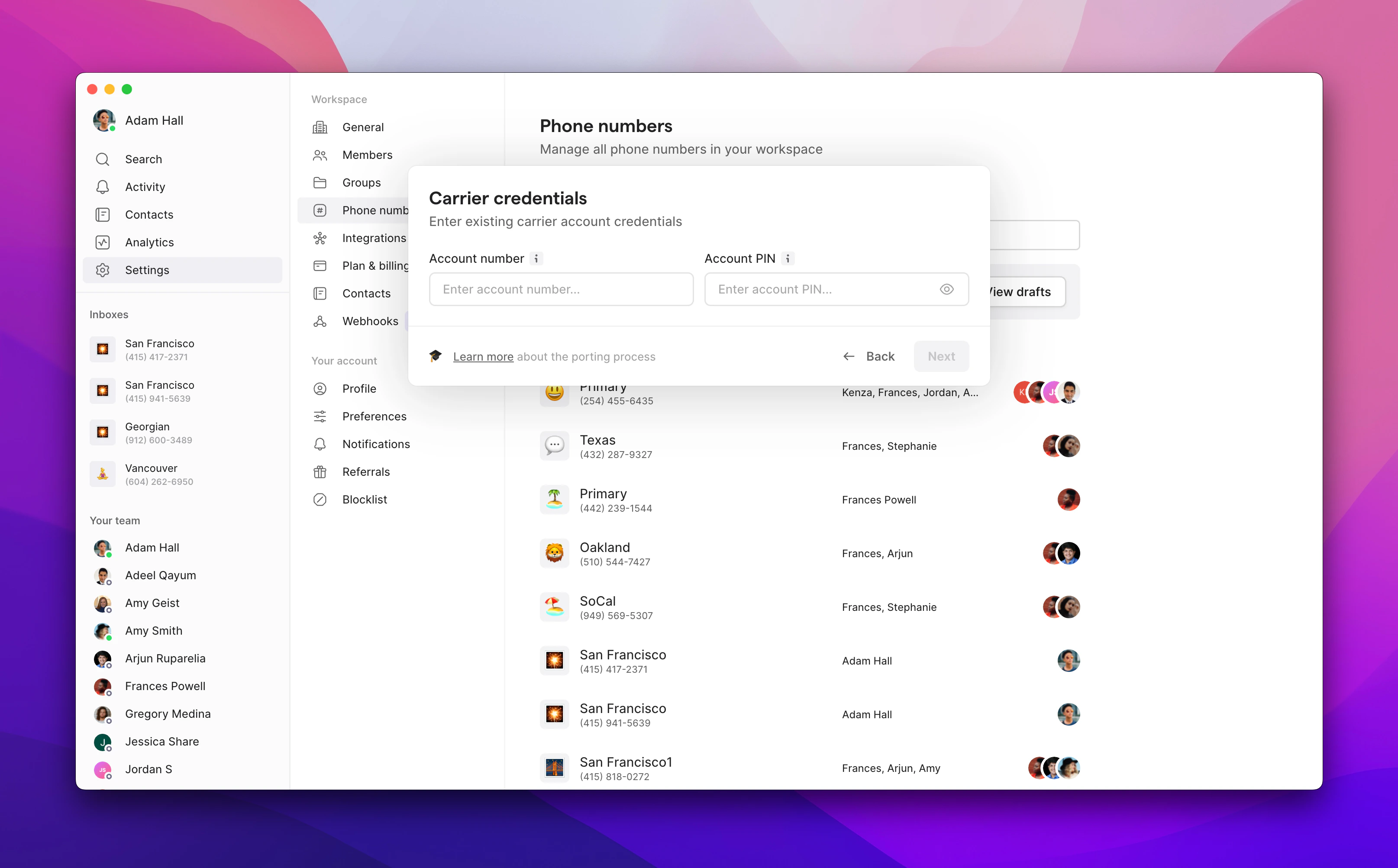
5. Enter your carrier credentials:
* **Account number**: Found on your bill or carrier dashboard
* **Account PIN**: Usually in your carrier account settings (contact carrier if unsure)
6. Customize your number settings and digitally sign the authorization.
After you submit your request, you **can't** make any changes. Our team will review and submit this to your carrier.
***
## How to port multiple phone numbers
Use this flow when you’re porting a group or block of numbers into Quo.
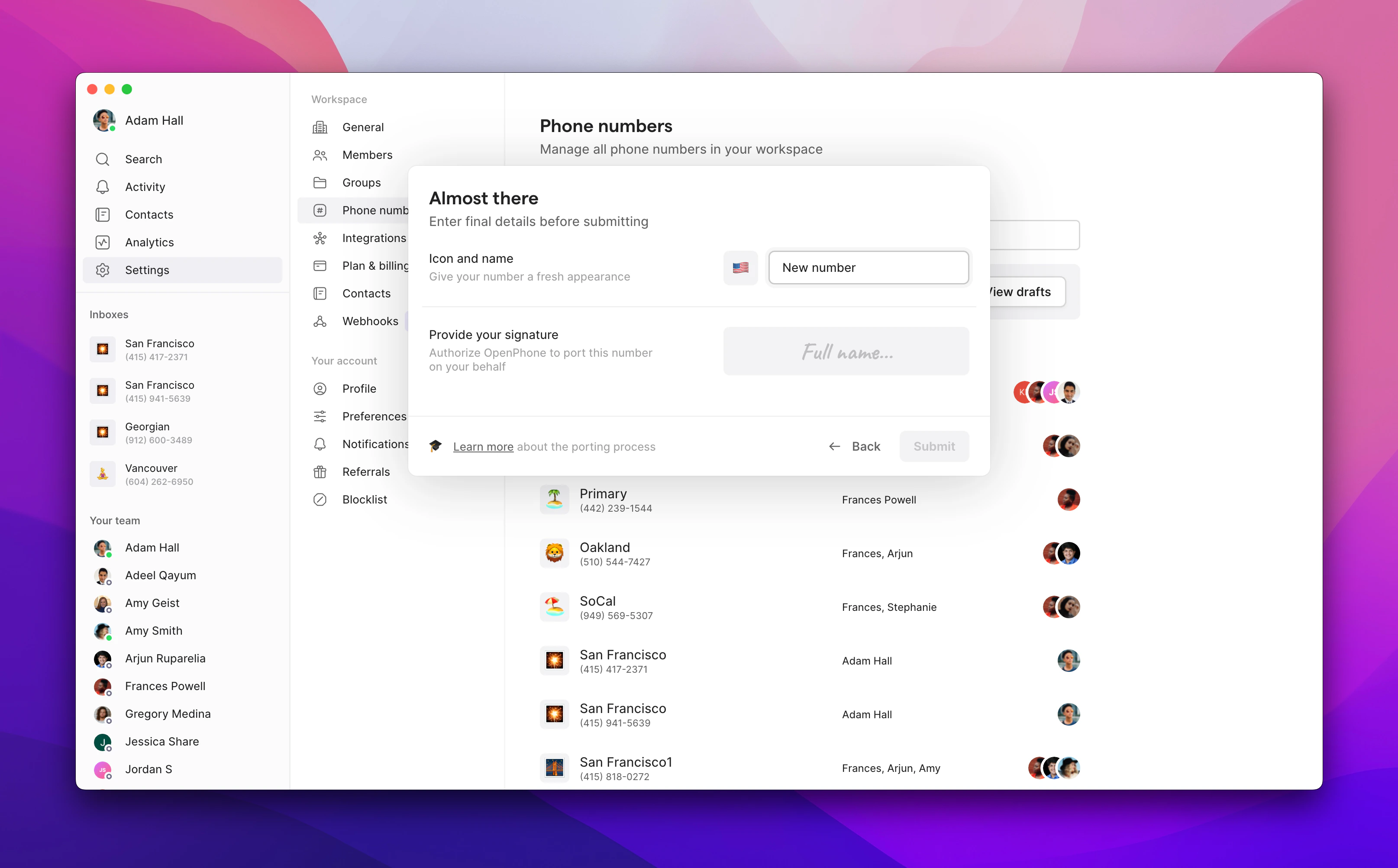
1. Begin a new [Port In Request](https://toolbox.quo.com/p/portrequest/newsubmission) using this form.
* Enter your **first name** and **last name**
* Enter the **email address linked to your Quo account**
* This is where the phone numbers will be initially assigned
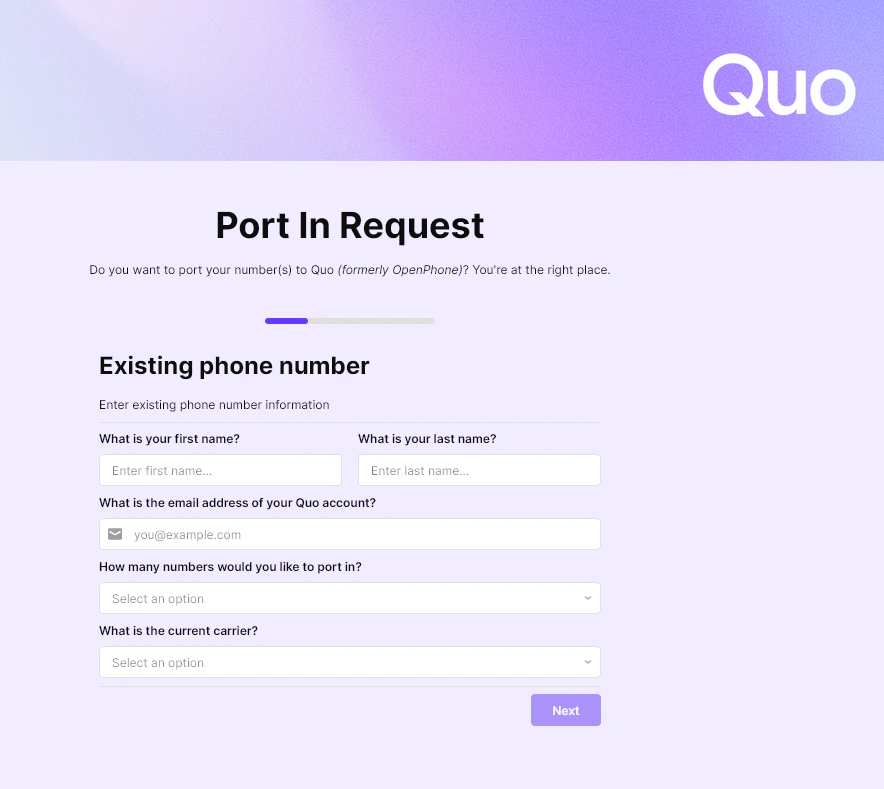
2. Please select, **More than one** from the drop down under **How many numbers would you like to port in?**
* There are two ways to upload your numbers:
1. Click the **Copy & Paste Number** button and paste the phone numbers in the field, *or*
2. Click the **Upload CSV** button to upload a CSV file with the phone numbers
* If you do not have a ready CSV file, you can click the **Download Template** button to provide the phone numbers to the file before uploading.
You may also use this form to porting **a single phone number**. Simply select, "**One"** from the dropdown and type your number into the field. However, [the easiest way to transfer a single number into Quo is with the in-app flow. ](https://support.quo.com/getting-started/porting/overview#porting-a-single-phone-number-in-the-app)
3. Choose the **current carrier**
* If your carrier is not listed, select **Other** and enter the name of your carrier
4. Click the **Review Numbers** button.
* This checks for duplicates and format validity.
5. Click the **Next** button.
6. On the next page, enter the account holder and billing details exactly as they appear on your carrier’s records:
* Business name (leave blank if you don’t have one)
* First and last name of the number owner
* Full billing/service address — must be a physical address, not a PO Box
* Country, city, state/province, and zip/postal code
7. Click the **Attach billing statement** and upload your file (max file size 4MB). If you don’t have a statement, you can upload a **receipt, invoice, Customer Service Record (CSR), or a screenshot** showing the phone number.
8. On the next page, provide the following information:
* **Account Number:** Found on your bill or carrier dashboard
* **Port-out/Transfer PIN:** This should be newly generated; enter 0000 if your carrier does not provide a PIN
9. **Digitally sign** the authorization.
10. Click the **Submit Request** button.
***
## What to expect during and after your transfer
These details apply whether you’re porting a single number or multiple numbers into Quo.
### Timeline expectations
* **Processing time**: Typically 1–2 weeks, depending on carrier response
* **Service continuity**: No interruption — continue using your existing provider until the confirmed port date
* **Activation**: Calling usually works immediately once the port completes; SMS may take up to 48 hours to stabilize
Customize your phone numbers while you wait! [Update your phone number settings](https://support.quo.com/core-concepts/phone-numbers/overview#naming-and-organizing-numbers) in Quo so everything is ready on day one.
### Checking port status
Track your porting request progress in two ways:
#### Email updates
We send status updates to your account email address throughout the porting process. Check your inbox for:
* Initial confirmation
* Carrier response updates
* Port date notification
* Completion confirmation
#### In-app status
View real-time status directly in Quo:
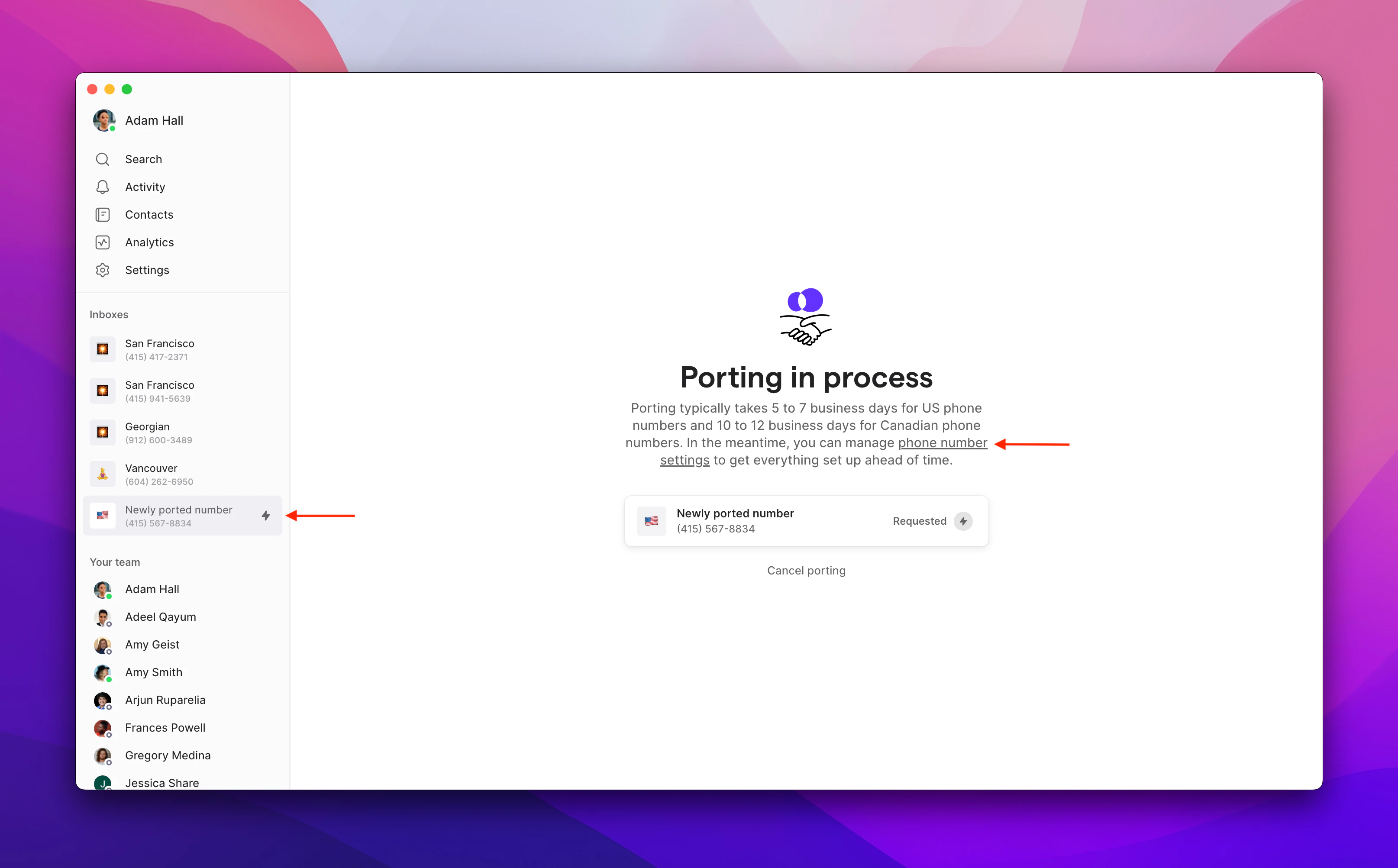
1. Click on your pending port number
2. Select **Phone number settings**
3. View current status and any required actions
### How to delete a temporary phone number
Once your number is transferred and fully active, you'll be able to delete the temporary number from your Quo workspace. Deleting a phone number doesn’t cancel your subscription. It only removes that specific number and adjusts your billing automatically.
**Owner or Admin permissions are required to delete phone numbers**, and must be done on Web or Desktop.
1. Go to [**Phone Numbers**](https://my.openphone.co/settings/my-phone-numbers) in workspace settings
2. Click the number you want to remove
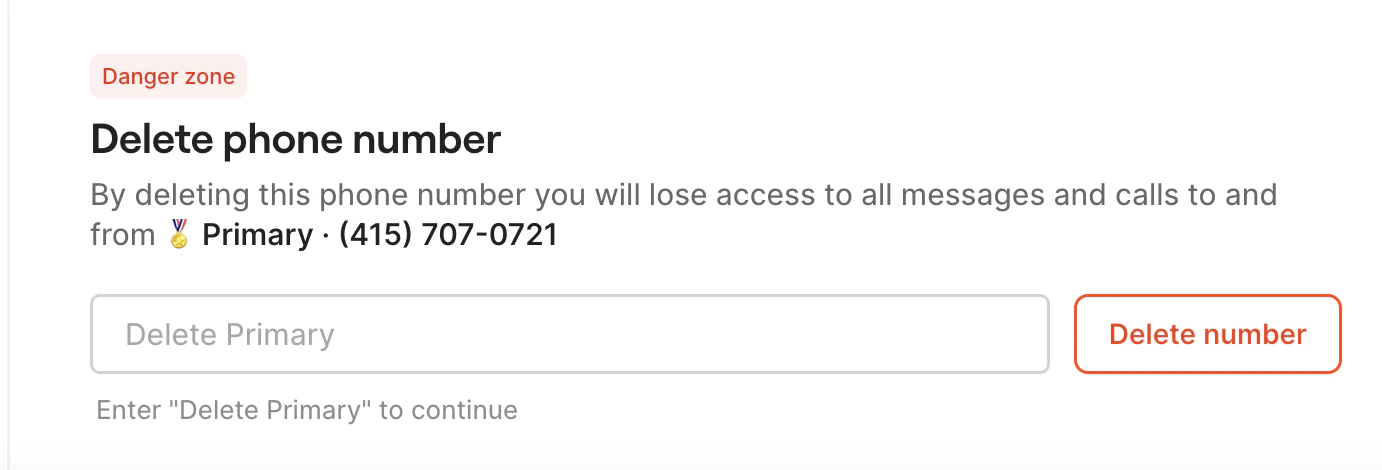
3. Scroll to **Danger Zone**
4. Click **Delete \[phone number name]**
5. Type **Delete \[phone number name]** to confirm
***
## Special considerations for iPhone users
When porting from an iPhone, you must deactivate iMessage and FaceTime to ensure all messages and calls route correctly to Quo.
### Remove from iMessage
1. Go to iPhone **Settings**
2. Tap **Messages**
3. Tap **Send & Receive**
4. Uncheck your ported number in **You can be reached by iMessage at**
### Remove from FaceTime
1. Go to iPhone **Settings**
2. Tap **FaceTime**
3. Uncheck your ported number in **You can be reached by FaceTime at**
If messages still aren't routing correctly, you may need to [deregister iMessage](https://selfsolve.apple.com/deregister-imessage/) completely.
Need assistance? [Submit a request](https://support.quo.com/help/submit-a-request) to our support team or [chat with us](https://support.quo.com/help/chat-with-us).
## FAQs
Yes, but consider these limitations:
* You'll need a data plan or WiFi to make/receive calls
* Some services won't send verification codes to virtual numbers
* Emergency services (911) aren't available
* Keep a personal number for authentication and emergency use
Simply type your carrier's name manually in the field. Our porting team handles requests from all US and Canadian carriers.
Yes, you can submit multiple porting requests. Each number requires its own complete application with billing information and authorization. If you have a port of 5+ numbers, please [submit your port in request here](https://toolbox.quo.com/p/portrequest/newsubmission), or feel free to contact our [Porting team](https://support.quo.com/help/submit-a-request) to initiate the process.
Common rejection reasons include:
* Mismatched account information
* Active contract obligations
* Unpaid balances
We'll notify you of any issues and help resolve them to resubmit.
Porting timelines are set by the releasing carrier and typically can't be expedited. Business numbers may take longer than personal numbers.
This means we currently don't have coverage for your phone number's location. The rate center is determined by the original telephone exchange and tied to the phone number's geographic location for local calling purposes. While we are working to cover more areas, there's no ETA when we might expand to a given area or exchange.
 2. Click **Continue to porting**
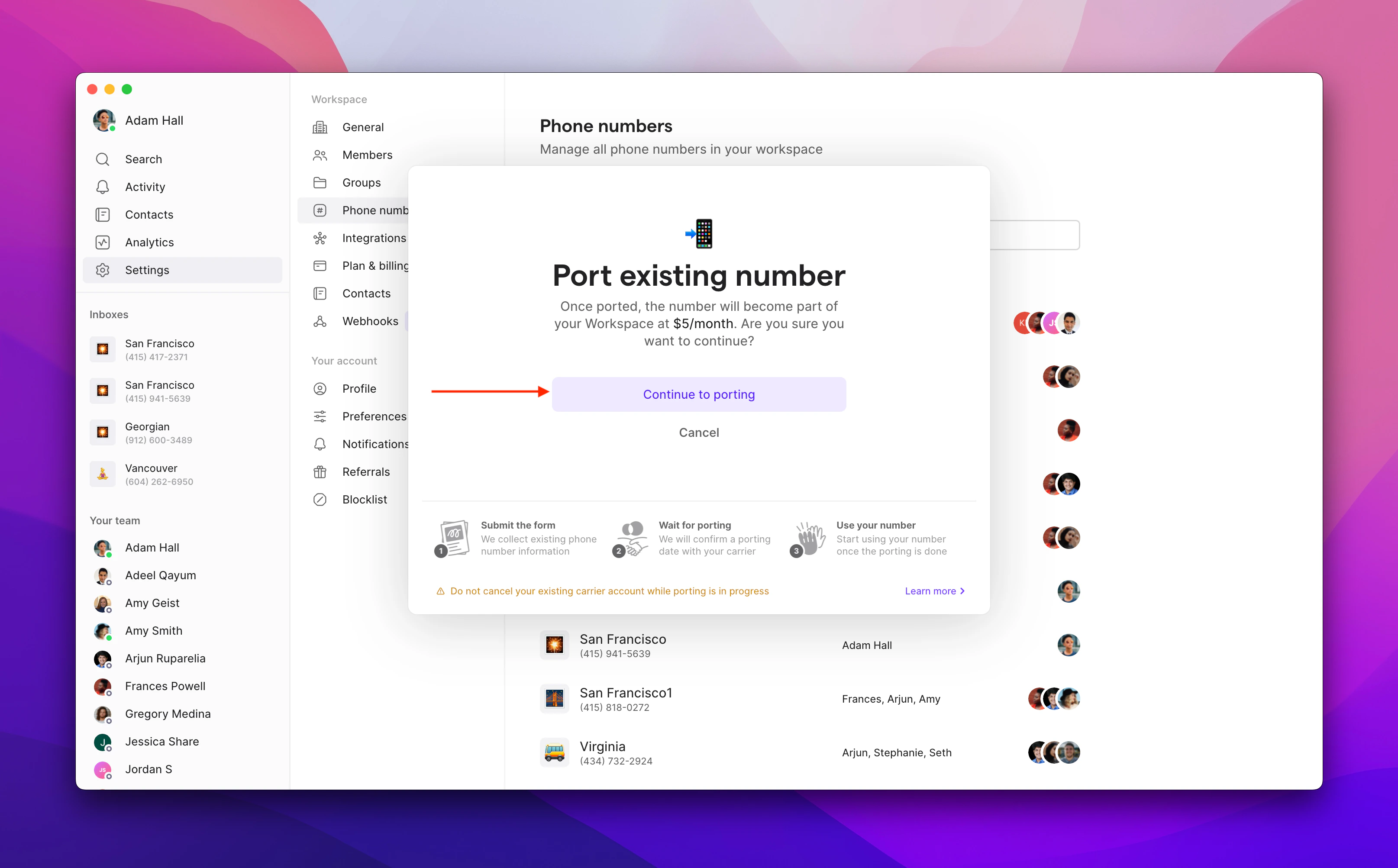 3. Enter your phone number and select your current carrier. If your carrier isn't listed, type it manually.
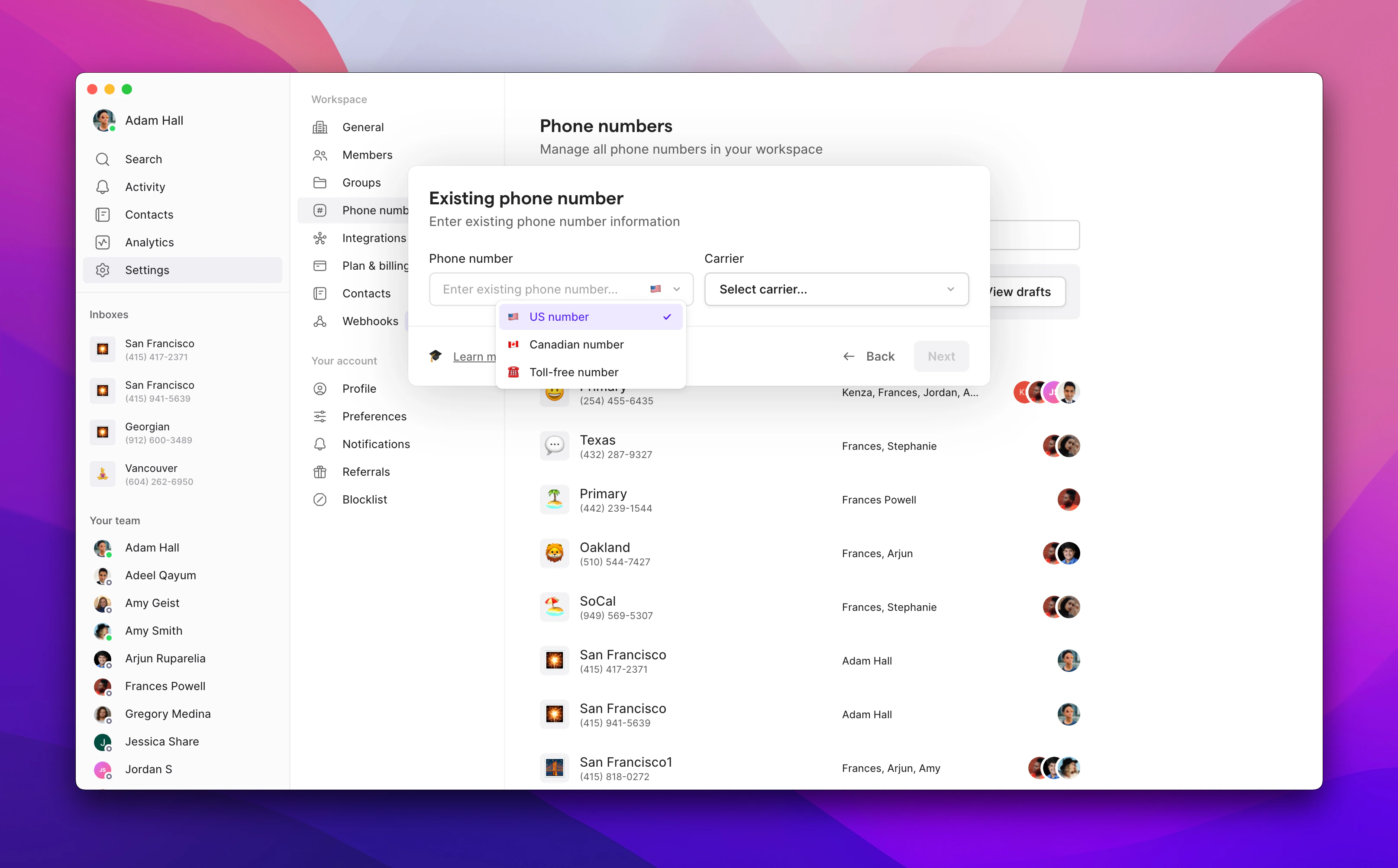 4. Upload your billing information and a recent statement.
 5. Enter your carrier credentials:
* **Account number**: Found on your bill or carrier dashboard
* **Account PIN**: Usually in your carrier account settings (contact carrier if unsure)
5. Enter your carrier credentials:
* **Account number**: Found on your bill or carrier dashboard
* **Account PIN**: Usually in your carrier account settings (contact carrier if unsure)
 6. Customize your number settings and digitally sign the authorization.
 2. Please select, **More than one** from the drop down under **How many numbers would you like to port in?**
* There are two ways to upload your numbers:
1. Click the **Copy & Paste Number** button and paste the phone numbers in the field, *or*
2. Click the **Upload CSV** button to upload a CSV file with the phone numbers
* If you do not have a ready CSV file, you can click the **Download Template** button to provide the phone numbers to the file before uploading.
2. Please select, **More than one** from the drop down under **How many numbers would you like to port in?**
* There are two ways to upload your numbers:
1. Click the **Copy & Paste Number** button and paste the phone numbers in the field, *or*
2. Click the **Upload CSV** button to upload a CSV file with the phone numbers
* If you do not have a ready CSV file, you can click the **Download Template** button to provide the phone numbers to the file before uploading.
 3. Choose the **current carrier**
* If your carrier is not listed, select **Other** and enter the name of your carrier
4. Click the **Review Numbers** button.
* This checks for duplicates and format validity.
3. Choose the **current carrier**
* If your carrier is not listed, select **Other** and enter the name of your carrier
4. Click the **Review Numbers** button.
* This checks for duplicates and format validity.
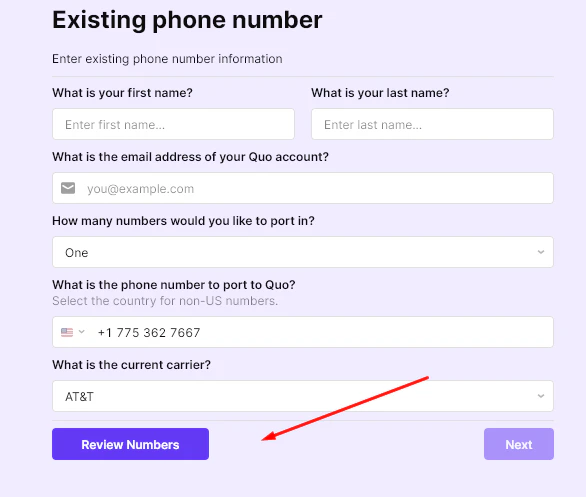 5. Click the **Next** button.
6. On the next page, enter the account holder and billing details exactly as they appear on your carrier’s records:
* Business name (leave blank if you don’t have one)
* First and last name of the number owner
* Full billing/service address — must be a physical address, not a PO Box
* Country, city, state/province, and zip/postal code
7. Click the **Attach billing statement** and upload your file (max file size 4MB). If you don’t have a statement, you can upload a **receipt, invoice, Customer Service Record (CSR), or a screenshot** showing the phone number.
5. Click the **Next** button.
6. On the next page, enter the account holder and billing details exactly as they appear on your carrier’s records:
* Business name (leave blank if you don’t have one)
* First and last name of the number owner
* Full billing/service address — must be a physical address, not a PO Box
* Country, city, state/province, and zip/postal code
7. Click the **Attach billing statement** and upload your file (max file size 4MB). If you don’t have a statement, you can upload a **receipt, invoice, Customer Service Record (CSR), or a screenshot** showing the phone number.
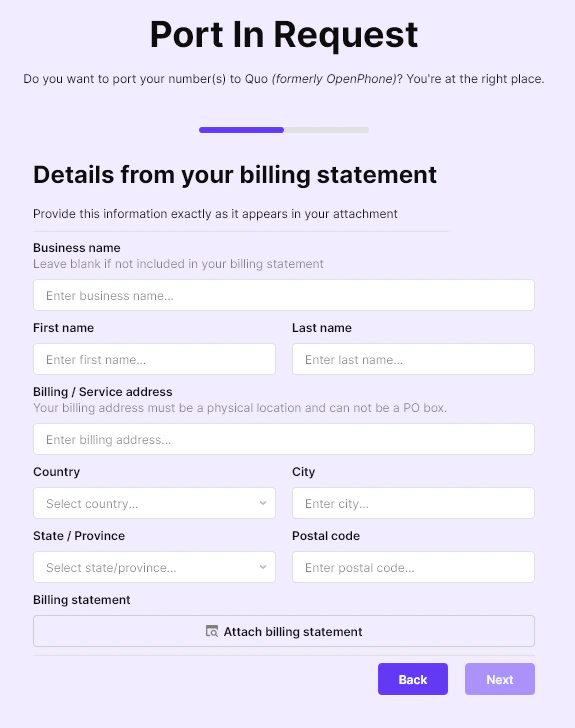 8. On the next page, provide the following information:
* **Account Number:** Found on your bill or carrier dashboard
* **Port-out/Transfer PIN:** This should be newly generated; enter 0000 if your carrier does not provide a PIN
9. **Digitally sign** the authorization.
10. Click the **Submit Request** button.
8. On the next page, provide the following information:
* **Account Number:** Found on your bill or carrier dashboard
* **Port-out/Transfer PIN:** This should be newly generated; enter 0000 if your carrier does not provide a PIN
9. **Digitally sign** the authorization.
10. Click the **Submit Request** button.
.png?fit=max&auto=format&n=oiUUkb01If-JfZZn&q=85&s=87ea051c72b3fd89f153581dc10b7923) ***
## What to expect during and after your transfer
These details apply whether you’re porting a single number or multiple numbers into Quo.
### Timeline expectations
* **Processing time**: Typically 1–2 weeks, depending on carrier response
* **Service continuity**: No interruption — continue using your existing provider until the confirmed port date
* **Activation**: Calling usually works immediately once the port completes; SMS may take up to 48 hours to stabilize
***
## What to expect during and after your transfer
These details apply whether you’re porting a single number or multiple numbers into Quo.
### Timeline expectations
* **Processing time**: Typically 1–2 weeks, depending on carrier response
* **Service continuity**: No interruption — continue using your existing provider until the confirmed port date
* **Activation**: Calling usually works immediately once the port completes; SMS may take up to 48 hours to stabilize
 ### How to delete a temporary phone number
Once your number is transferred and fully active, you'll be able to delete the temporary number from your Quo workspace. Deleting a phone number doesn’t cancel your subscription. It only removes that specific number and adjusts your billing automatically.
### How to delete a temporary phone number
Once your number is transferred and fully active, you'll be able to delete the temporary number from your Quo workspace. Deleting a phone number doesn’t cancel your subscription. It only removes that specific number and adjusts your billing automatically.
 ***
## Special considerations for iPhone users
When porting from an iPhone, you must deactivate iMessage and FaceTime to ensure all messages and calls route correctly to Quo.
### Remove from iMessage
1. Go to iPhone **Settings**
2. Tap **Messages**
3. Tap **Send & Receive**
4. Uncheck your ported number in **You can be reached by iMessage at**
### Remove from FaceTime
1. Go to iPhone **Settings**
2. Tap **FaceTime**
3. Uncheck your ported number in **You can be reached by FaceTime at**
***
## Special considerations for iPhone users
When porting from an iPhone, you must deactivate iMessage and FaceTime to ensure all messages and calls route correctly to Quo.
### Remove from iMessage
1. Go to iPhone **Settings**
2. Tap **Messages**
3. Tap **Send & Receive**
4. Uncheck your ported number in **You can be reached by iMessage at**
### Remove from FaceTime
1. Go to iPhone **Settings**
2. Tap **FaceTime**
3. Uncheck your ported number in **You can be reached by FaceTime at**